Build a Flow that calculates a total
Start with one calculation: add a shipping fee of 9 to the request subtotal, then return the total. For a subtotal of 75, the result is 84.
Before you begin: create a Flow named Order total in an editable change set. In Data Contract, declare input subtotal as Number and output total as Number.
1. Add and connect steps
- Open Design → Add Steps.
- Add a Set Fields step and name it
Add shipping fee. - Add a Response step named
Return total. - Connect Start → Add shipping fee → Return total.
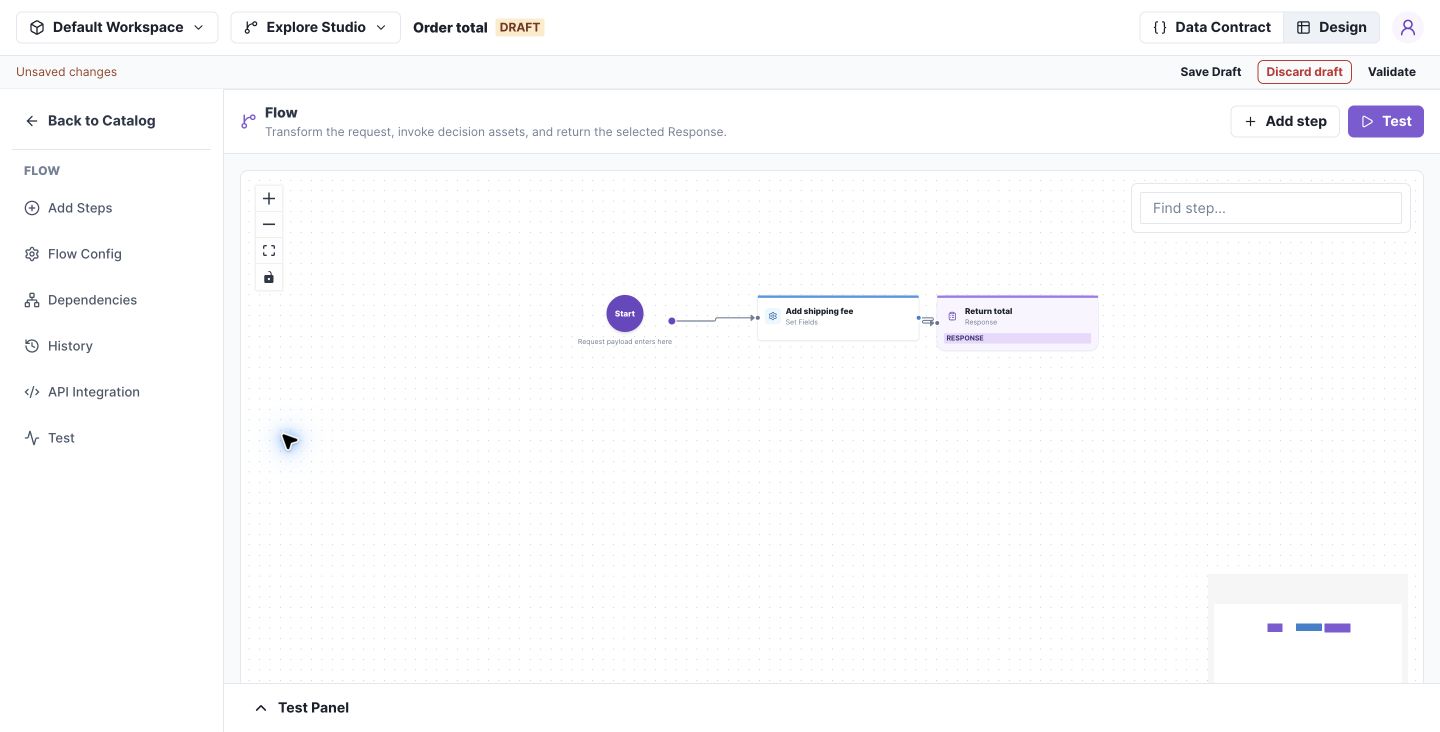
Begin with a short complete route before adding lists, branches, or dependencies. Select the image to open it at full size.
2. Configure the calculation
Open Add shipping fee, add an assignment targeting output.total, and select Use expression. In Edit expression, choose Add ($add) with a field argument input.subtotal and a numeric fixed-value argument 9. Complete the expression and close the step drawer.
The summary should read output.total = (input.subtotal + 9). In Response, return the declared output fields.
3. Test the complete route
Open Test → Test Input and run:
{"subtotal":75}
In Result, expect:
{"total":84}
Use Trace to inspect the steps executed. Save Draft and Validate.
If a field selector is empty: confirm the field exists in Data Contract, the preceding connections are complete, and the chosen target is Local or Output. Inputs cannot be assignment targets.
Next, explore the step reference when adding a list operation or a call to another decision.
Flow behavior
Preserve the request
input.* is immutable. Use local.* for working values and output.* for response fields. You do not need a separate originalInput copy.
For a list, transform input.items into local.items, filter or sort that local list, aggregate it, then assign the final output. Reuse local.items when its previous value is no longer needed. In-place operations must target a compatible Local list.
Add expressions and dependencies
Visual and JSON expression modes keep separate expressions; only the selected mode is used. Changing modes does not convert the expression.
When calling a Table, Tree, or Flow, map the called asset's inputs from available fields and map its result into the caller. Review dependency selection before merge: a published dependency and a same-change-set draft are different choices.
Complete each branch
Give every branch a complete route to a Response. Current graph editing permits one incoming connection per step; branches do not merge into a shared downstream step. Test both sides of each condition.
Next: connect several assets
Follow Order fulfillment with subflows to combine list transformations, a reusable charges Flow, a Decision Table, a Decision Tree, and reference data in one complete example.